Infrastructure · Cloud-Native
Keep passwords and keys out of your code — whichever vault you use
Applications receive the credentials they need directly from a secure vault (HashiCorp Vault, AWS or Azure), so secrets never sit in source code or configuration files.
Proof of concept: External secrets for Kubernetes: Vault, AWS and Azure
Where this helps
- Passing security reviews and audits
- Organisations that use more than one cloud
- Changing credentials without redeploying applications
The rest of this page is the technical deep dive — how it was built and what its limits are.
The technical problem
Applications need credentials, but storing secrets in code or plain manifests is risky, and many organisations use more than one secret manager.
How the architecture works
- 01 · Provision
Terraform configures Vault (with Kubernetes auth), AWS Secrets Manager or Azure Key Vault.
- 02 · Connect
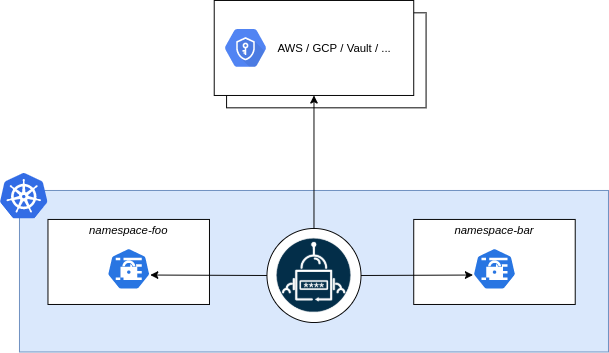
A SecretStore tells the External Secrets Operator how to authenticate to each provider.
- 03 · Sync
ExternalSecret resources map provider secrets to native Kubernetes secrets.
What was being explored
How to keep the application side identical while the source of secrets changes — useful for hybrid and multi-cloud estates where Vault, AWS and Azure coexist.
What was implemented
Terraform for each provider, SecretStore and ExternalSecret manifests per provider, and a Vault deployment via Helm values, accompanied by a two-part article.
Limitations and next steps
- Focuses on synchronisation; rotation policies and audit are out of scope.
- Example credentials and auth methods are simplified for local demonstration.
Related writing
Managing Kubernetes Secrets: A Guide to HashiCorp Vault, AWS Secrets Manager, and Azure Key Vault Integration
The hands-on half: provisioning each secret provider with Terraform and injecting secrets into Kubernetes through the External Secrets Operator.
Managing Kubernetes Secrets: A Guide to HashiCorp Vault, AWS Secrets Manager, and Azure Key Vault Integration
Why secrets should not live in code or plain manifests, and how external secret managers change the way applications on Kubernetes receive credentials.